
Inspection Lifecycle
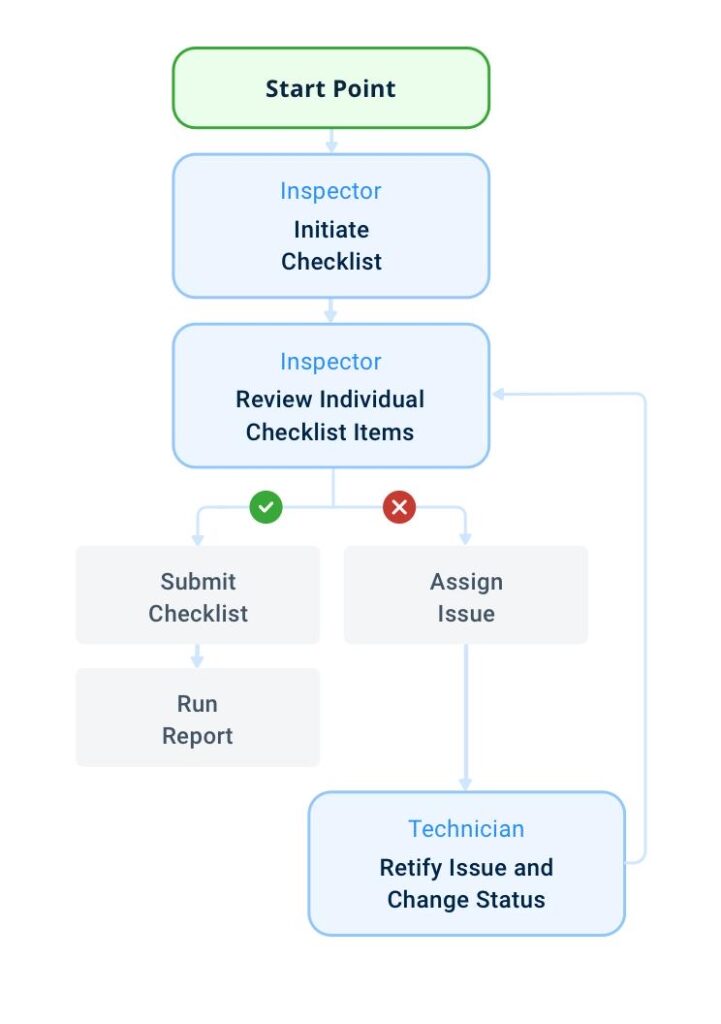
The Inspection Lifecycle in uAuditor describes the full journey of an inspection—from creation to completion, reporting, and corrective action tracking.
Understanding this lifecycle helps organizations standardize operational monitoring and ensure inspection results lead to measurable improvements across locations.
Each inspection follows a structured sequence designed to support accountability, documentation, and performance visibility.
Overview of the Inspection Lifecycle
A typical inspection moves through the following stages:
- Inspection creation
- Inspection assignment (optional)
- Inspection execution
- Evidence capture
- Score calculation
- Report generation
- Corrective action tracking (if failures exist)
Each stage contributes to improving operational consistency.
Step 1: Inspection Creation
An inspection begins when a user starts a checklist using a template.
Inspections can be created:
- manually from the dashboard
- from the inspections list
- from assigned tasks
- through scheduled inspections
- by scanning a template QR code
The selected template defines the structure and evaluation criteria.
Step 2: Inspection Assignment
Some inspections are assigned automatically through schedules or tasks.
Assignment ensures:
- inspections are completed on time
- responsibilities are clearly defined
- execution coverage across locations is maintained
- accountability is tracked per inspector
Assigned inspections appear in the Tasks module.
Step 3: Inspection Execution
During execution, inspectors answer checklist questions defined in the template.
Depending on configuration, inspectors may:
- select response values
- enter numeric readings
- upload photos or documents
- select locations or assets
- follow instructions attached to questions
Responses determine inspection outcomes and scoring.
Step 4: Evidence Capture
Inspectors may capture supporting evidence during inspections, including:
- photos
- videos
- documents
- location verification
Evidence improves transparency and strengthens compliance documentation 📸
Templates can require media for specific questions automatically.
Step 5: Score Calculation
After completion, uAuditor calculates the inspection score automatically.
Scores are based on:
- failed responses
- priority weights
- validation rules
- score ratio configuration
- checklist structure
This ensures consistent evaluation across all inspections.
Step 6: Report Generation
Once completed, the inspection becomes a structured report.
Reports include:
- checklist responses
- failure points
- inspection score
- inspector information
- location details
- timestamps
- captured evidence
Reports can be viewed, exported, or shared with stakeholders.
Step 7: Corrective Action Tracking
If failures are detected, corrective actions can be created manually or automatically.
Corrective actions help teams:
- resolve issues quickly
- assign responsibilities
- track completion progress
- document improvements
- prevent recurring problems
This closes the operational feedback loop.
Why the Inspection Lifecycle Matters
Following a structured lifecycle helps organizations:
- standardize inspection execution
- improve documentation quality
- detect issues earlier
- strengthen compliance tracking
- increase accountability across teams
- maintain operational consistency across branches
It ensures inspections produce actionable insights—not just reports.
Best Practices for Managing the Inspection Lifecycle
To maximize inspection effectiveness:
- use structured templates for each operational process
- enable automatic action creation for failed items
- require evidence for critical checkpoints
- review reports regularly
- monitor inspection score trends
- follow up on corrective actions quickly
Managing the full lifecycle ensures inspections lead to measurable operational improvements 🚀


